

Vai al contenuto

ΛG

__

cropped-seguimi-su-youtube-grigio2.png
Menu principale
  • ⏎
  • BLOG
  • ARTICOLI
    • Tecnologia
    • Giochi
    • Pensieri
    • Apple Mac
    • Windows
    • Linux
    • Raspberry-Pi
    • Software
  • RECENSIONI
    • LE MIE RECENSIONI
    • RECENSIONI FILMS
  • I VIDEO
    • I MIEI ULTIMI VIDEO
    • LE CREAZIONI DI MATILDA
  • TUTORIALS
  • CHI SONO?
Pulsante chiaro/scuro
  • Personale

Come installare XAMPP in CentOS

Lex G 7 Maggio 2016
logo

INSTALLARE XAMPP SU CENTOS

In questo tutorial vi spiegherò in modo molto semplice e passo passo come installare XAMPP su un server CentOS ed avere così un server web pronto per ogni tipo di test ed installazione.

(La piattaforma XAMPP è disponibile per Windows, Mac OSX e Linux)

Cosa vuol dire XAMPP?

XAMPP letteralmente significa:
X = Cross Platform (Windows,MAC OSX,Solaris and Linux)
A = Apache
M = MySQL
P = PHP
P = Perl

Installare XAMPP su CentOS/RHEL

Seguite i seguenti passi per una corretta installazione su CentOS/RHEL 6.5

Step 1: Download di XAMPP
Suggerisco di scaricare sempre l’ultima versione di XAMPP denominata sempre “latest stable XAMPP package for Linux.” La potete trovare sul sito ufficiale: URL.

Il tutorial è fatto scaricando come esempio la versione XAMPP package version 1.8.3-3

Si può scaricare dalla repository ufficiale di XAMPP da sourceforge.net

Step 2: Trasferire il file sul Server

Dopo il download trasferite il pacchetto sul vostro server ,transfer the file by using scp command

In alternativa, direttamente sul Server dal Terminale, usando il comando wget per scaricarlo direttamente.
Esempio:


1
2
yum install wget
wget http://downloads.sourceforge.net/project/xampp/XAMPP%20Linux/1.8.3/xampp-linux-x64-1.8.3-3-installer.run

Step 3 : Give executable permission to downloaded XAMPP script
Give executable permission to downloaded XAMPP script.In our case, we have downloaded the filexampp-linux-x64-1.8.3-3-installer.run (The file name may be different in your case depends upon latest package and architecture of Operating system)


1
chmod +x xampp–linux–x64–1.8.3–3–installer.run

Step 4: Run XAMPP installer script
Run the XAMPP installer script.While script is running,it will ask some question.Give the answer as per your requirement. The script will install the XAMPP stack in /opt/lampp directory. You can change this path at the time of installation.


1
2
3
4
5
6
7
8
9
10
11
12
13
14
15
16
17
18
19
20
21
22
23
24
25
26
27
28
29
30
31
32
33
34
35
./xampp–linux–x64–1.8.3–3–installer.run
 
——————————————————————————————————————
Welcome to the XAMPP Setup Wizard.
 
——————————————————————————————————————
Select the components you want to install; clear the components you do not want
to install. Click Next when you are ready to continue.
 
XAMPP Core Files : Y (Cannot be edited)
 
XAMPP Developer Files [Y/n] :y
 
Is the selection above correct? [Y/n]: y
 
——————————————————————————————————————
Installation Directory
 
XAMPP will be installed to /opt/lampp
Press [Enter] to continue :
 
——————————————————————————————————————
Setup is now ready to begin installing XAMPP on your computer.
 
Do you want to continue? [Y/n]: y
 
——————————————————————————————————————
Please wait while Setup installs XAMPP on your computer.
 
Installing
0% ______________ 50% ______________ 100%
#########################################
 
——————————————————————————————————————
Setup has finished installing XAMPP on your computer.


Step 4: Allow ALL network to access XAMPP Server

I did troubleshooting after installing XAMPP,hence directly writing solution in this step.You can read about the Error and its solution from this post.

Edit the last section of file called httpd-xampp.conf.Add new line Require all granted and comment the line Require local by using # sign


1
vi /opt/lampp/etc/extra/httpd–xampp.conf
 
 
1
2
3
4
5
<LocationMatch “^/(?i:(?:xampp|security|licenses|phpmyadmin|webalizer|server-status|server-info))”>
    # Require local
    Require all granted
    ErrorDocument 403 /error/XAMPP_FORBIDDEN.html.var
</LocationMatch>

Step 5 : Restart all services by using lampp script
Restart all the services by using below given command


1
/opt/lampp/lampp restart

Below given is the reference from my system


1
2
3
4
5
6
7
8
9
[root@localhost ~]# /opt/lampp/lampp restart
Restarting XAMPP for Linux 1.8.3–3…
XAMPP: Stopping Apache...ok.
XAMPP: Stopping MySQL...ok.
XAMPP: Stopping ProFTPD...not running.
XAMPP: Starting Apache...ok.
XAMPP: Starting MySQL...ok.
XAMPP: Starting ProFTPD...ok.
[root@localhost ~]#

Step 6: Now open the XAMPP in Web browser

Now open the web browser and type the URL or ip-address in address bar
The XAMPP dashboard will be open
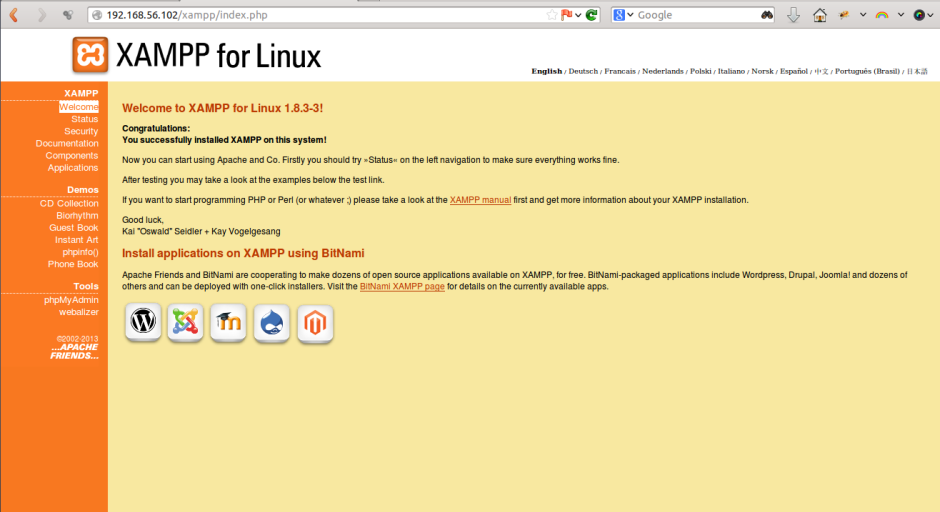
xampp-21

Step 7: Open phpmyadmin

To open phpmyadmin of XAMPP,simply type URL of server with /phpmyadmin in address bar

Example : Replace 192.168.56.102 with your XAMPP server ip address(run ifconfig command to get your server ip)

http://192.168.56.102/phpmyadmin
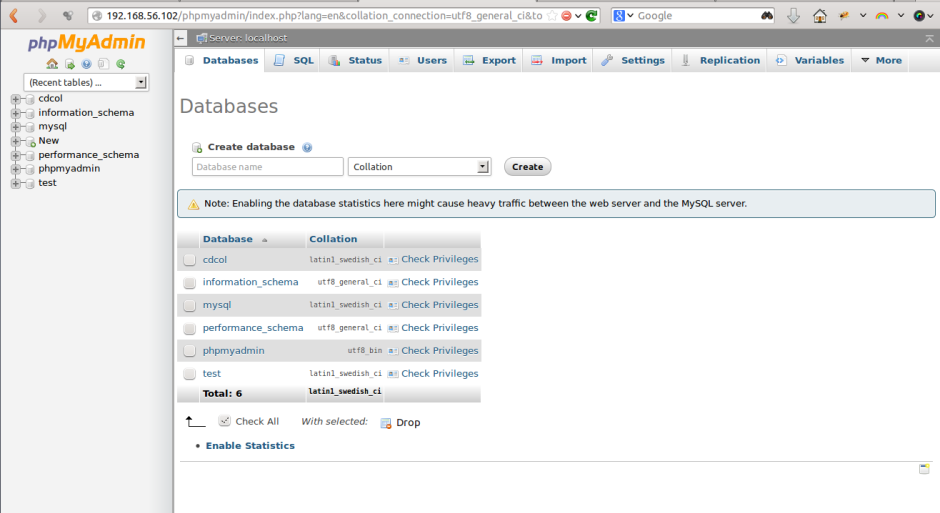
xampp-phpmyadmin2

Salva

Salva

Salva

Scansiona il QR Code

Navigazione articolo

Precedente: Cosa succede in un minuto su Internet?
Successivo: Come installare Ubuntu Mate su Raspberry-Pi 2 o 3

Storie correlate

maxresdefault
  • Personale
  • Tecnologia
  • Ultime

DJI non ce lo dice ma i suoi Mic Mini funzionano benissimo anche con altri prodotti

Lex G 25 Marzo 2025
fee_786_587_png
  • Blog
  • Notizie
  • Personale
  • Tecnologia

Ma cosa vogliono dire le sigle sulle nostre SD?

Lex G 17 Maggio 2023
9b1262_protezione_casa_HomeIm_779x400
  • Notizie
  • Personale
  • Software
  • Tecnologia

Rischi di Sicurezza nella Domotica Domestica: Proteggere la Tua Casa Connessa

Lex G 11 Giugno 2023

Le mie recensioni

KKTICK TANK T6 🔥 GPS + MAPPE OFFLINE: è DAVVERO così BUONO? TEST & RECENSIONE

I Tutorials

Ho ELIMINATO Adobe | Ecco perché sono passato a UPDF (MEGLIO e più ECONOMICO?)

I video di Matilda

legami UNBOXING MAGIC! 🎃 Matilda scopre le BLIND BOX HALLOWEEN

Ultimi Articoli

  • HDMI SENZA FILI fino a 400 METRI?! 😱 Test BDFFLY Wireless HDMI 5GHz: Funziona Davvero?
  • JUOVI SOUND J1 | La Cassa Bluetooth Impermeabile Definitiva
  • aosu T2 Ultra System le mie telecamere di sicurezza da oggi!
  • XPPen Pilot Pro: il joystick che può cambiare il modo di fare video editing
  • 🦶 OK TAPE KINESIO TAPE: LA SOLUZIONE CHE NON TI ASPETTI PER IL PIEDE!

Ma questi articoli li hai già visti?

hqdefault.jpg
  • NO-TOP
  • Blog
  • Tecnologia
  • Ultime

HDMI SENZA FILI fino a 400 METRI?! 😱 Test BDFFLY Wireless HDMI 5GHz: Funziona Davvero?

Lex G 21 Settembre 2026
hqdefault
  • NO-TOP
  • Blog
  • Notizie
  • Tecnologia
  • Ultime

JUOVI SOUND J1 | La Cassa Bluetooth Impermeabile Definitiva

Lex G 21 Settembre 2026
aosu T2 Ultra Kit telecamere di sicurezza 4K
  • Blog
  • Cronaca
  • Notizie
  • Spettacolo
  • Tecnologia
  • Ultime

aosu T2 Ultra System le mie telecamere di sicurezza da oggi!

Lex G 15 Settembre 2026
Bende kinesitherapie una soluzione naturale per i dolori
  • NO-TOP
  • Blog
  • Ultime

🦶 OK TAPE KINESIO TAPE: LA SOLUZIONE CHE NON TI ASPETTI PER IL PIEDE!

Lex G 9 Agosto 2026
© copyright ΛG dal 1997 - tutti i diritti e contenuti riservati | MoreNews di AF themes.
ΛG
  • ⏎
  • BLOG
  • ARTICOLI
    • Tecnologia
    • Giochi
    • Pensieri
    • Apple Mac
    • Windows
    • Linux
    • Raspberry-Pi
    • Software
  • RECENSIONI
    • LE MIE RECENSIONI
    • RECENSIONI FILMS
  • I VIDEO
    • I MIEI ULTIMI VIDEO
    • LE CREAZIONI DI MATILDA
  • TUTORIALS
  • CHI SONO?
We use cookies on our website to give you the most relevant experience by remembering your preferences and repeat visits. By clicking “Accept All”, you consent to the use of ALL the cookies. However, you may visit "Cookie Settings" to provide a controlled consent.
Cookie SettingsAccept All
Manage consent

Privacy

Questo sito Web utilizza i cookie per migliorare la tua esperienza durante la navigazione nel sito Web. Di questi, i cookie classificati come necessari vengono memorizzati nel browser in quanto sono essenziali per il funzionamento delle funzionalità di base del sito web. Utilizziamo anche cookie di terze parti che ci aiutano ad analizzare e comprendere come utilizzi questo sito web. Questi cookie verranno memorizzati nel tuo browser solo con il tuo consenso. Hai anche la possibilità di disattivare questi cookie. Tuttavia, la disattivazione di alcuni di questi cookie potrebbe influire sulla tua esperienza di navigazione.
Necessary
Sempre abilitato
Necessary cookies are absolutely essential for the website to function properly. This category only includes cookies that ensures basic functionalities and security features of the website. These cookies do not store any personal information.
Non-necessary
Any cookies that may not be particularly necessary for the website to function and is used specifically to collect user personal data via analytics, ads, other embedded contents are termed as non-necessary cookies. It is mandatory to procure user consent prior to running these cookies on your website.
ACCETTA E SALVA
ΛG
  • ⏎
  • BLOG
  • ARTICOLI
    • Tecnologia
    • Giochi
    • Pensieri
    • Apple Mac
    • Windows
    • Linux
    • Raspberry-Pi
    • Software
  • RECENSIONI
    • LE MIE RECENSIONI
    • RECENSIONI FILMS
  • I VIDEO
    • I MIEI ULTIMI VIDEO
    • LE CREAZIONI DI MATILDA
  • TUTORIALS
  • CHI SONO?

[ Placeholder content for popup link ] WordPress Download Manager - Best Download Management Plugin